



I found Jimmy John's Sandwiches most useful when I treated it as a quick ordering tool rather than a complete replacement for every way of buying lunch. It is a free Food & Drink app from Jimmy John's Sandwiches, built around choosing fresh sandwiches or boxed lunches for delivery or pickup and keeping an eye on rewards. In everyday use, its value comes from reducing a familiar task to a few taps, especially when I already know what I want.
That simplicity also makes it worth judging from an inclusive point of view. An ordering app has to work for people using it in bright sunlight, with one hand, under time pressure, or while dealing with dietary and sensory concerns. I found several practical strengths, but I would not assume that a short ordering path automatically makes the experience comfortable for everyone. The best fit is someone who wants Jimmy John's food and prefers handling the order digitally; people needing highly detailed customization or a broader restaurant comparison may be better served elsewhere.
How the ordering experience supports different users
Readable choices and a fairly direct path
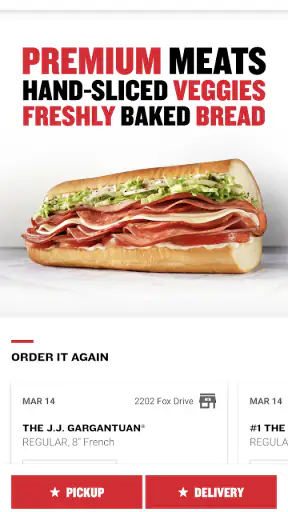
The app’s purpose is easy to understand as soon as it opens: choose food, decide between delivery and pickup, and complete the order. That focused scope is a genuine advantage for readers who find large restaurant platforms tiring. Instead of browsing an entire marketplace, I can stay within one brand’s menu and move toward a meal without sorting through unrelated restaurants, promotions, or delivery providers.
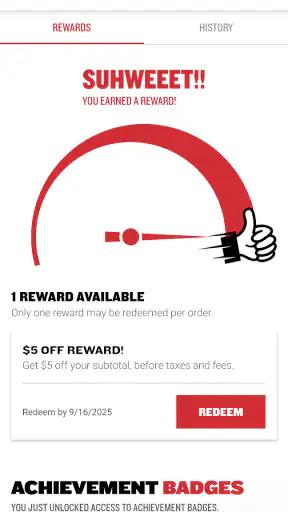
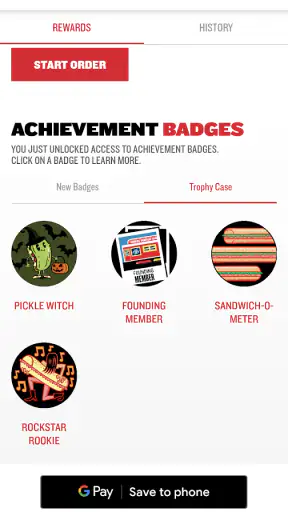
I also like that the rewards area belongs in the same experience. For a regular customer, checking progress before placing an order can become part of the normal routine rather than a separate loyalty website or paper-card system. The practical tip is to look at rewards before finalizing the meal, not after; that is when I am most likely to notice whether the order fits the way I usually buy lunch.
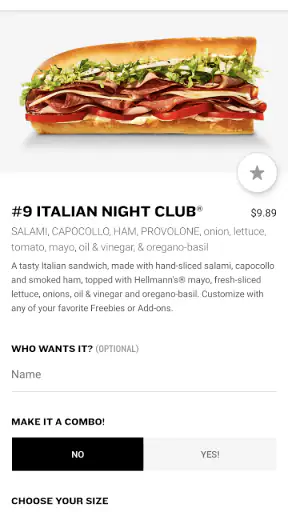
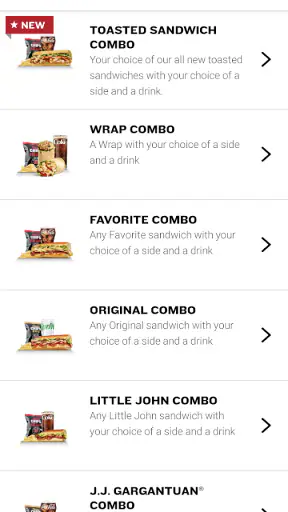
The interface is most comfortable when I already have a clear plan. If I know the sandwich, size, and collection method I want, the app feels purposeful. If I am trying to understand every ingredient, compare several combinations, or make a complicated request, the compact flow can feel less reassuring. A direct layout is helpful, but it does not remove the need to read each choice carefully.
For users with low vision, readability depends on more than whether the words are technically present. Menu names, modifiers, totals, and reward information all need to be distinguishable at the moment they matter. I found it sensible to pause on the review step instead of rushing through it, particularly when ordering for someone else. That final check is useful for anyone who finds dense screens or changing selections difficult to track.
One-handed use, attention, and sensory load
A realistic scenario is ordering lunch during a short break while standing in a busy office hallway. In that situation, I value a focused restaurant app because I can begin the order without having to explain my choice to someone at a counter. The trade-off is that a phone screen can be hard to manage while carrying a bag, wearing gloves, or trying to keep track of a conversation. I would start the order before the break if timing matters, rather than assuming the final taps will always be effortless.
People with motor difficulties may appreciate the reduced number of decisions compared with a broad delivery marketplace, but a small touch target or a selection that changes unexpectedly can still create friction. My practical advice is to use the review stage as a deliberate pause: confirm the restaurant method, food, and total before submitting. That habit reduces the cost of an accidental tap, even though it cannot solve every interface issue.
Sensory needs deserve equal attention. A sandwich app is quieter than a restaurant dining room, and ordering from home or a parked car can avoid noise, queues, strong smells, or social pressure. Pickup can therefore be a useful option for someone who finds crowded counters overwhelming. Delivery may remove the trip altogether, although the user still has to monitor the order and be ready to receive it.
For someone with food sensitivities, the app can be a convenient starting point because the menu is gathered in one place, but I would not treat a digital selection as a guarantee about preparation conditions. When an allergy is serious, I would contact the restaurant directly and explain the concern rather than relying only on a tap-through order. That is one of the clearest cases where convenience should come second to personal safety.
Delivery, pickup, and different daily situations
The choice between delivery and pickup gives the app more flexibility than a simple menu viewer. Pickup suits me when I am already near a Jimmy John's location and want to avoid waiting at the counter. Delivery is more useful when leaving home, work, or a hotel room is difficult. The right choice changes with mobility, weather, transport, fatigue, and whether I can comfortably answer the door.
For a caregiver ordering for another person, the app can make the meal decision easier to handle remotely, but the final responsibility remains with the person placing the order. I would read the summary aloud or share the exact selections when the recipient has difficulty viewing the screen. This is a small workflow improvement, yet it prevents a common problem: treating a digital order as self-explanatory when another person will actually eat it.
The same applies to shared office lunches. The app is convenient for placing a known order, but it is less ideal when several people are still debating what they want. In that case, collecting everyone’s choices first is more efficient than passing one phone around while the order is being built. Rewards can also complicate a group purchase if the person paying and the person who normally uses the account are different, so I would decide in advance whose account should handle it.
Travel is another useful test. If I am unfamiliar with the area, a brand-specific app can be less overwhelming than comparing every nearby restaurant, but it also limits me to Jimmy John's locations and menu choices. Someone who needs a particular cuisine, a wider range of dietary options, or one combined order from several restaurants should probably use a broader service instead.
What the app does well for regular customers
The strongest part of the experience is consistency. The developer is Jimmy John's Sandwiches, so the app is not trying to be a general food marketplace. That narrow identity helps me return to the same ordering pattern without relearning an entire platform. For a repeat customer, the rewards feature adds a practical reason to keep using the app rather than switching between channels.
Its popularity suggests that this focused approach works for many people: the app has a 4.8 average from around 288 thousand ratings and more than 5 million installs. I read those figures as evidence of broad acceptance, not proof that every user will find the interface equally easy. A high average can coexist with specific barriers for people using assistive technologies, people with limited dexterity, or customers who need unusually detailed food information.
The app is also approachable from a cost perspective because it is free to install, and its content rating is Everyone. Those details make it suitable for a household where different ages may help with ordering. They do not mean every meal is inexpensive or that every child should place an order without adult supervision; the useful point is that access to the app itself does not require buying it first.
On Android, the listed minimum operating-system requirement is version 9, which covers many devices still in ordinary use. I would still keep the app updated when possible. The current version is 7.7.0, and staying current is especially sensible for an ordering tool because an outdated build can make a simple task harder if screens or account functions change around it.
Where inclusive use still has limits
The biggest limitation is that I cannot turn a focused menu into a fully personalized ordering assistant. People who need extensive ingredient explanations, careful allergen conversations, or complicated substitutions may find the app too dependent on reading and selecting the available options. In those cases, calling the restaurant or speaking with staff is the better route, even if it takes longer.
Visual clarity can also vary with the situation. A phone used outdoors, at low brightness, or with enlarged system text may show less information at once and require more scrolling. Someone with low vision should take advantage of the device’s own display and accessibility settings where available, then check whether the order summary remains understandable. I would not place an important order while walking or in glare; the app is easier to use when I can stop and concentrate.
Motor access has similar trade-offs. A short process is not automatically an easy process if it relies on precise taps, rapid scrolling, or remembering what changed on the previous screen. Voice input or switch access may help at the device level, but the actual experience depends on how those tools interact with the app. I would test a small, low-stakes order first rather than discovering a problem when ordering for a group.
There is also a social barrier that technology cannot completely remove. Delivery may be preferable for someone who cannot comfortably enter a store, but receiving food can still involve timing, communication, and getting to the door. Pickup can avoid waiting inside, yet it still requires reaching the location. I appreciate having both routes, while recognizing that neither is universally accessible in every building or neighborhood.
Who should choose it and who should skip it
I would recommend the app to a regular Jimmy John's customer who wants a repeatable way to order sandwiches or boxed lunches, prefers pickup or delivery, and likes having rewards in the same place. It is particularly useful for people who already know the menu and want to reduce the number of decisions. It also makes sense for someone who finds busy ordering environments stressful and can complete the process more comfortably from a quiet location.
I would be more cautious about recommending it to someone whose main priority is comparing restaurants, building a highly customized meal, or getting personal assistance with a serious allergy. A general delivery platform may be better for comparison, while direct contact with the restaurant is safer for questions that require a human answer. The app is a convenience layer, not a substitute for every form of communication.
My most useful workflow is simple: choose the ordering method first, make the food selections without rushing, check rewards before payment, and review the complete order in a quiet moment. If another person will eat the meal, confirm the choices with them. If accessibility or allergy concerns are significant, use the app to understand the menu, then contact the restaurant before committing.
A balanced verdict for everyday access
After using it as an ordering app rather than judging it like a full restaurant guide, I see a clear strength: it keeps a familiar Jimmy John's purchase in one focused place. The free app is practical for repeat orders, supports both delivery and pickup, and gives rewards a useful role in the routine. Its narrow purpose can make it less intimidating than a crowded marketplace, especially when I already know what I want.
My reservation is that focused does not always mean inclusive. Users who need detailed assistance, extensive customization, or a guaranteed answer about sensitive ingredients may need a phone conversation or another service. People with visual, motor, or sensory needs should test the ordering flow under their real conditions rather than assuming a popular app will fit automatically.
Overall, I would keep Jimmy John's Sandwiches installed if I regularly order from the chain and value a straightforward digital route. It is a good practical choice for planned lunches, quiet-at-home ordering, and repeat customers who want to track rewards. I would skip it as my only food app if I need broad restaurant choice or hands-on support. Used with a careful review step and direct contact when the situation calls for it, it offers useful convenience without pretending to solve every access problem.


